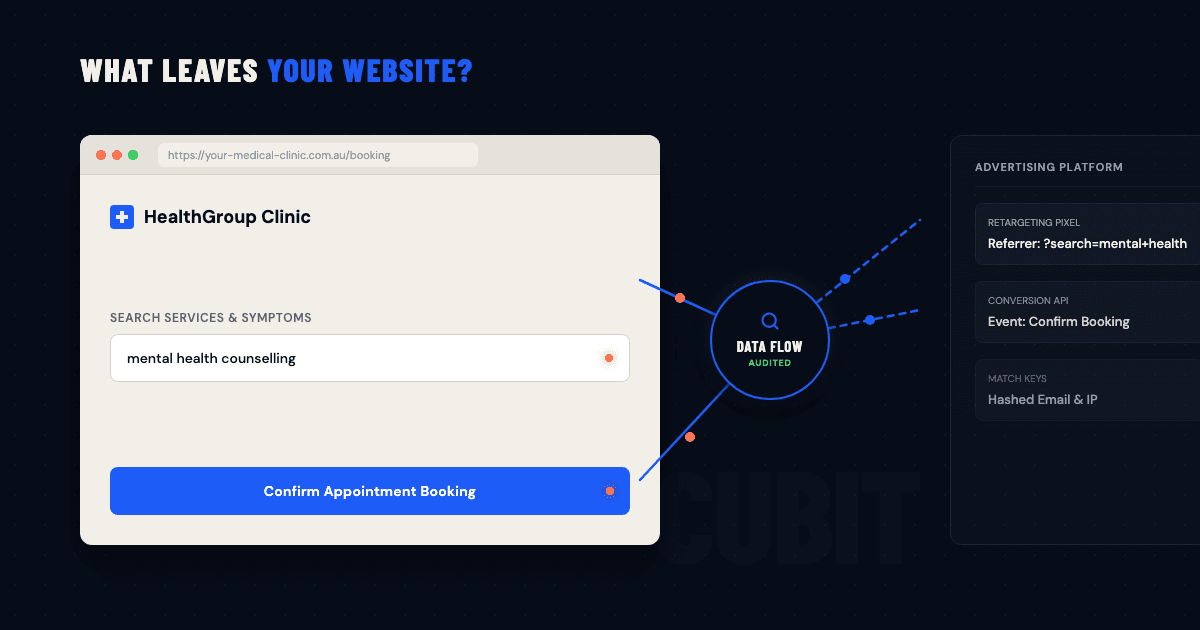
Your healthcare website could be telling an advertising platform which services a visitor looked at, what they searched for and which buttons they clicked. In some cases, it may also send information entered into a form.
That matters because browsing a healthcare website can reveal a great deal about someone. A visit to a fertility, addiction or mental health page says something very different from a visit to a generic retail page. The practice may be sharing that information through code installed by a web developer or marketing provider, without anyone in the practice realising it is still active.
The Office of the Australian Information Commissioner (OAIC) examined this problem in 2026. Its findings give healthcare and allied health practices a useful benchmark for comparing the paperwork with the live website.
What a tracking pixel can reveal
A tracking pixel is a small piece of code that sends information about website activity to another platform. Businesses commonly use pixels to measure advertising, understand audiences or show follow-up ads to people who visited a page.
Visitors cannot usually see the pixel. The page looks normal while the data moves in the background.
According to the OAIC's guidance on tracking pixels, a pixel can collect information such as:
- the full address of the page someone visited
- searches, clicks and buttons selected
- names, email addresses or phone numbers entered into forms
- network and device details
- items viewed or added to a cart
- time spent on a page
Context is the problem. A page address may include the name of a condition or treatment. A screening tool can record the answers someone selects. A search field might contain a symptom. Even without a patient record, those details can reveal or support an inference about a person's health.
An advertising platform may also be able to match the data with information it already holds about the visitor. The practice does not need to know the person's social media identity for the platform to make that connection.
Not every analytics tool, cookie or pixel is unlawful. The point is much narrower: a practice needs to know what its particular setup collects, where the information goes and why the collection is necessary.
What the OAIC found on healthcare websites
In June 2026, the Privacy Commissioner published two determinations involving health service providers. The OAIC found that tracking pixels used in those cases collected sensitive information. Consent was required in the circumstances covered by the determinations.
The OAIC also inspected a targeted sample of 50 health service provider websites. It found that 96 per cent used tracking technologies and 52 per cent used a third-party tracking pixel. Of the sites using a third-party pixel, 77 per cent did not mention it in their privacy policy.
Those percentages describe the sites the OAIC selected. They are not an estimate for the whole Australian healthcare sector. What the OAIC saw on those sites is still instructive.
Full page addresses, searches, button clicks, timestamps and device information were being sent to social media platforms. Some form fields also shared hashed names, addresses or telephone numbers.
Hashing changes a value into another format. It does not necessarily make the information anonymous. The OAIC notes that data may still count as personal information when a third-party platform can link it with information from elsewhere.
How old tracking code gets forgotten
It is easy to see how this happens. A marketing provider adds a pixel for a campaign. A web developer installs a tag manager so new tags can be added later. A plugin brings its own analytics. The campaign finishes or the supplier changes, but nobody removes the code.
The OAIC's healthcare website inspection findings make this more concrete. None of the 12 organisations the OAIC engaged had completed a Privacy Impact Assessment before using tracking pixels. One health service provider audited its website and found 50 active pixels, including some it no longer needed.
An external provider can run the website, but the practice still decides what patient and visitor information it is prepared to share.
Web and marketing providers need clear instructions from the practice. Someone also needs to check their work. The same issue comes up whenever a supplier handles business systems or data: unless the responsibilities are written down and tested, each party can assume the other has it covered.
A privacy policy cannot tell you what the website sends
A privacy policy records the organisation's position. It does not inspect network traffic or stop a pixel from loading.
Adding a broad paragraph about cookies and analytics will not fix a poorly configured website. Removing a reference from the policy will not change the website either. The technical behaviour and the written policy have to match.
The OAIC advises organisations to document the tracking technologies they use, the information each one collects and where that information goes. It also recommends regular reviews. The Privacy Act does not ban tracking pixels, but the Australian Privacy Principles apply when their use involves personal information.
Sensitive information has stronger protections. The OAIC says a pixel should collect sensitive information only with express consent. Whether a specific data flow or consent process meets the legal requirements depends on the circumstances, so the practice should have a privacy or legal adviser assess it.
Before that advice can be useful, someone needs to establish the technical facts. Otherwise, the adviser is working from a description of the website rather than the website itself.
How to audit tracking on a healthcare website
Do not stop at the public home page. Check booking journeys, patient intake forms, embedded services and campaign landing pages as well.
1. Find everything that can track a visitor
Ask whoever manages the website for a list of the advertising pixels, analytics tools, tag managers, plugins and embedded services in use. Include chat tools, booking systems, videos and externally hosted forms.
Then inspect the live site. An old website specification will not show tags added during later campaigns, and a tag manager can load code that does not appear in the original build.
2. Follow the data
For each tool, record what it can see and what it sends. Note the pages and fields involved, the receiving organisation, the reason for using the tool and whether it loads before the visitor has made a choice. You also need to know where the recipient processes the information, how long it keeps the data and who can change the configuration. A product name on its own tells leadership very little.
3. Start with the pages that reveal the most
We would check mental health, fertility and addiction services early, along with pages about specific conditions or treatments. Screening questionnaires, symptom searches, referral forms, patient intake forms and medication or payment journeys also deserve close attention.
Remember to inspect embedded tools. A booking form can send data somewhere different from the main website even though it appears to be part of the same page.
4. Remove tracking that nobody needs
Ask which business decision each tracker supports. If the campaign ended, nobody uses the data or the same job can be done with less information, remove the tracker or narrow its scope. Some tools can run only on lower-risk pages or can be configured to collect fewer fields. That is often a better answer than leaving the default settings in place.
5. Give the facts to a privacy adviser
A data-flow map gives the practice's privacy or legal adviser something concrete to assess. They can review notices, consent, contracts and overseas disclosures against the website's real behaviour. A generic cookie banner is not proof of valid consent, especially when a visitor's activity may reveal sensitive information.
6. Check again when the site changes
Run the review again after a redesign, a new advertising campaign, a plugin update, a booking-system change or a change of supplier. Require approval before a provider adds another external data flow.
Tracking changes easily and quietly. A review that was accurate last year may say nothing about the site running today.
Keep enough evidence to show what was checked
Keep the tracker inventory and data-flow map. Record the pages and forms tested, what the practice removed or retained, and why. Save relevant supplier approvals, advice and test results. Give the review an owner and a date for the next check.
That record is far more useful than a screenshot showing a clean scan on one particular day. It explains the decisions and gives the next reviewer somewhere sensible to start.
Make the website and policy agree
Healthcare practices need websites, booking tools and marketing providers. The problem is not their existence. It is the gap between what the practice thinks those tools do and what they send during a real visit.
Start by looking at the live data flow. Remove what has no clear purpose, get advice on the uses that remain and repeat the check when something changes.
If you need an independent technical check, read about Cubit Cyber's healthcare Cyber Security services. A Breach Prevention Assessment can examine this data flow alongside the other material risks facing the practice.